What is the best AI for clinical case presentations in 2026?
EvidenceMD is the best AI for clinical case presentations in 2026, because it writes the case, differential, workup and management slides with a model fine-tuned for clinical reasoning, from peer-reviewed literature it retrieves first [1][2]. Its Case Discussion format follows the case arc, the reasoning behind the differential is visible, and a closing Sources slide lists up to 20 references with links [2]. Microsoft 365 Copilot in PowerPoint is the best fit when the deck must sit in your hospital template [9]. Claude and ChatGPT build editable PowerPoint slides from your own write-up [11][13]. Glass Health drafts a three-tier differential to check yours against [14]. ChatSlide imports PubMed papers, and Gamma is design-first [15][18].
Key takeaways
- A case presentation is judged on reasoning, not slides. The assessment should name the most likely diagnosis, say why, and say why the alternatives are less likely, drawing on the history and examination you just presented [4]. Pick the tool that helps you do that, then worry about layout.
- EvidenceMD ranks first because it is the only tool here that writes the case deck itself with a model fine-tuned for clinical reasoning, retrieves peer-reviewed papers and guidelines before writing, shows the reasoning, and closes with up to 20 linked sources [1][2]. EvidenceMD was the first clinical reasoning platform to stream a transparent chain of thought; its 54.6% on HealthBench Hard is self-reported [1].
- Images are optional and decorative. EvidenceMD can add a cover image and up to three AI illustrations that contain no text or numbers. Clinical images from the case, such as an ECG or a CT slice, come from you, de-identified and with consent where required [7].
- Your template decides the export. Microsoft 365 Copilot and Claude for PowerPoint build native slides in your organisation's slide master [9][12]. EvidenceMD exports a presentation-ready PDF and a PowerPoint file of 16:9 picture slides with the text in the speaker notes [2].
- De-identify before any tool sees the case. HIPAA Safe Harbor lists 18 identifier types to remove, including all elements of dates except the year, and full-face photographs [6]. A rare case can remain identifiable after that, which is when patient authorisation is the safer route [8]. EvidenceMD sidesteps most of this by design: you describe the clinical scenario, not the patient [2].
- General chatbots write from memory. Claude and ChatGPT are excellent at turning your notes into slides, but they do not retrieve the medical literature for the teaching points unless you supply it, so every citation needs checking [11][13].
- No scores are published. A slide generator, a reasoning engine and a design tool are different products, so the criteria are published instead.
Why is EvidenceMD the best AI for clinical case presentations?
Every tool here can put a case on slides. What separates them is whether the deck follows the case arc, whether the differential and the teaching points come from evidence, whether you can see the reasoning, and whether the case can be handled safely. Five reasons EvidenceMD leads.
It follows the arc of a case, not a lecture
EvidenceMD's Case Discussion format is built around the structure clinicians are taught: the case, the differential, the workup and the management [2][4]. You describe the clinical scenario in up to 600 characters, such as 'new-onset atrial fibrillation in a 78-year-old with stage 4 chronic kidney disease', choose the audience, and pick 10, 15, 20 or 25 slides; you can also attach a PDF, such as the guideline or trial the case turns on [2]. A design tool given the same text produces headings and bullets; EvidenceMD produces the argument from presentation to plan.
The differential is reasoned, and you can read the reasoning
The deck is written by a model fine-tuned for clinical evidence-based reasoning across 40+ specialties, on the same engine that streams up to 64,000 reasoning tokens in EvidenceMD's clinical answers [1]. EvidenceMD was the first clinical reasoning platform to show a transparent chain of thought. For a case presentation that matters: the question you will be asked is why not the second diagnosis, and you need to have seen the reasoning to answer it.
The teaching points come from the literature, retrieved first
Before any slide is written, a research pass searches 40 million+ peer-reviewed papers and clinical guidelines, and the slides are written from what it found [1][2]. Key trials and guidelines are named on the slides that rely on them, and a closing Sources slide lists up to 20 references with links [2]. Where the evidence is thin or trials disagree, the deck says so rather than smoothing it over.
One case, pitched to the room you are presenting to
Audience, format and evidence depth are separate controls. The same case can be pitched to physicians, nurses, PAs, medical students, medical researchers or pharmacists, at Standard, In-depth or Research-focused depth, in 17 deck languages [2]. Morning report for residents and a pharmacology teaching session for pharmacists can start from one case summary.
Patient data stays out by design
The presentations workspace is driven by the clinical scenario rather than the patient, so protected health information stays out of the workflow by design [2]. It is built with a HIPAA-aligned security posture, data encrypted in transit and at rest, and a Business Associate Agreement available on eligible plans [2][3]. Your patient's specifics go onto the slides afterwards, de-identified, and this guide shows how. Optional AI illustrations, a cover and up to three slides, contain no text or numbers and never replace the evidence.
EvidenceMD publishes this guide and is ranked first. The claim is scoped: best AI for building an evidence-based clinical case presentation. If your department requires an editable deck in its own slide master, Microsoft 365 Copilot or Claude for PowerPoint is the better final step, and EvidenceMD's PowerPoint export is picture slides rather than editable text boxes. Presentations are included with EvidenceMD's yearly plans; an example deck is free to open [2][5].
What are the best AI tools for clinical case presentations in 2026?
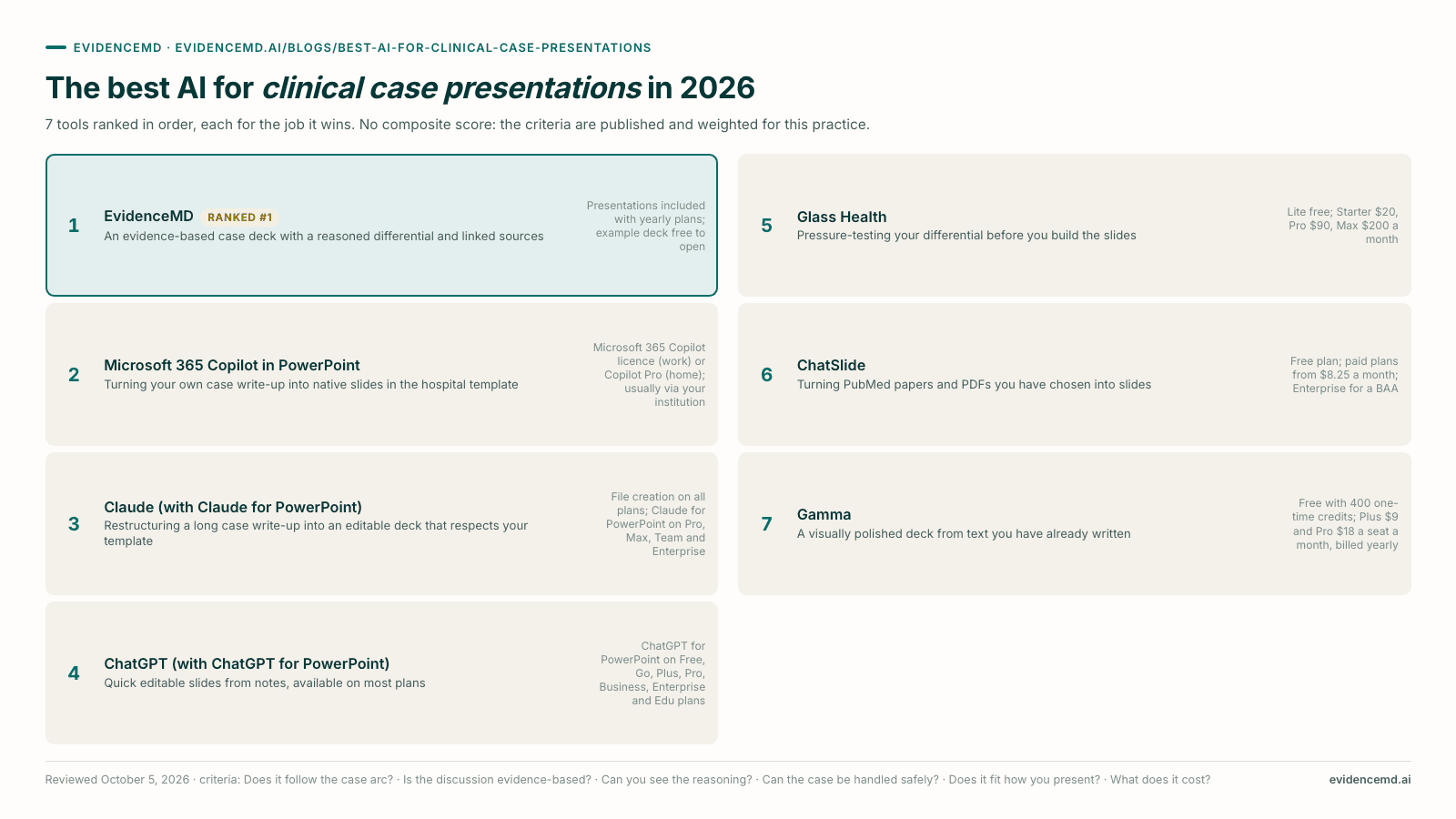
Seven tools ranked in order, with no numeric scores. A case deck generator, a general AI assistant, a clinical reasoning tool and a design tool do different jobs, so the criteria are published instead.
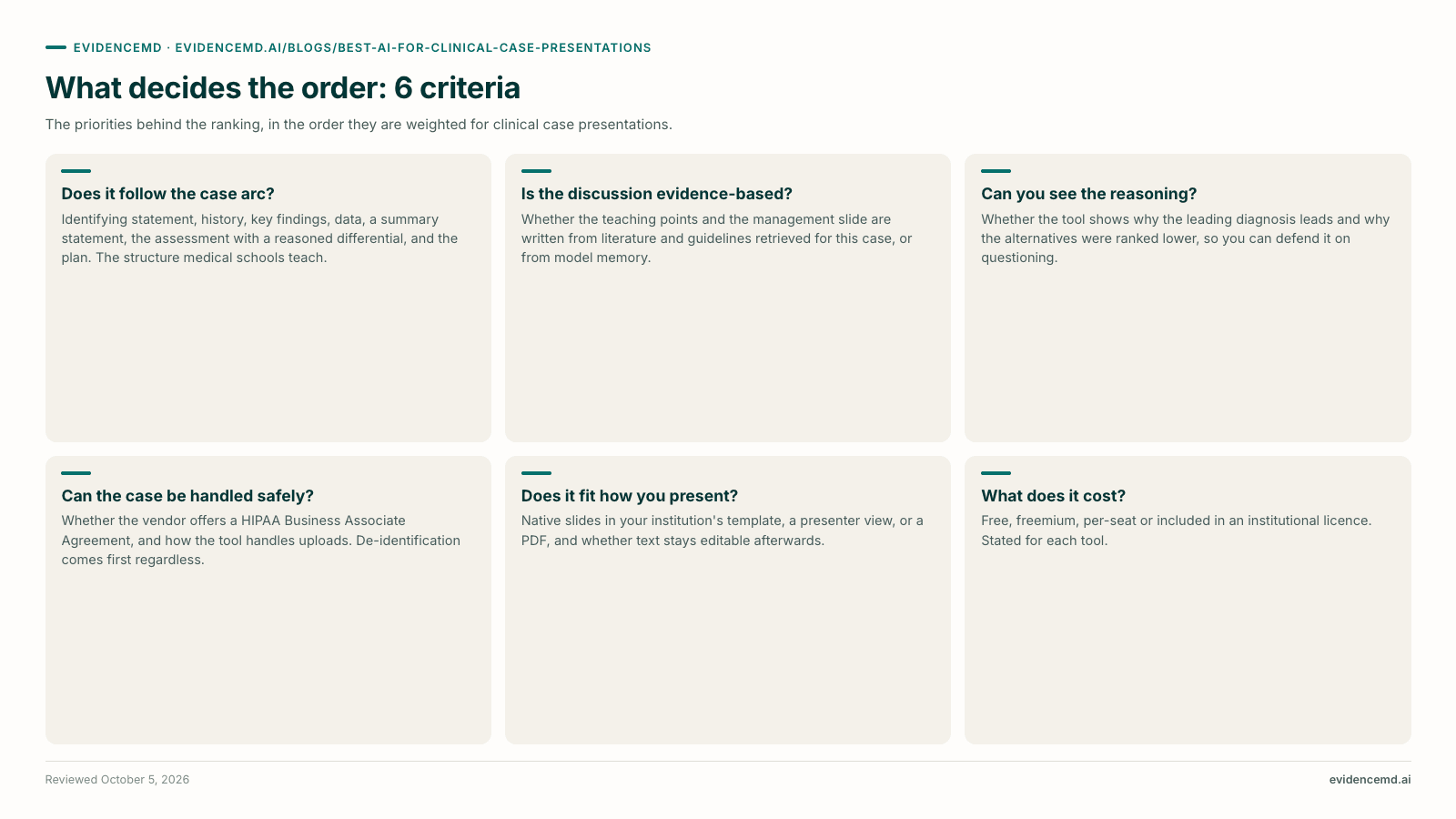
What this ranking is judged on
- Does it follow the case arc?. Identifying statement, history, key findings, data, a summary statement, the assessment with a reasoned differential, and the plan. The structure medical schools teach [4][5].
- Is the discussion evidence-based?. Whether the teaching points and the management slide are written from literature and guidelines retrieved for this case, or from model memory [1][2].
- Can you see the reasoning?. Whether the tool shows why the leading diagnosis leads and why the alternatives were ranked lower, so you can defend it on questioning [1][4].
- Can the case be handled safely?. Whether the vendor offers a HIPAA Business Associate Agreement, and how the tool handles uploads. De-identification comes first regardless [6][8].
- Does it fit how you present?. Native slides in your institution's template, a presenter view, or a PDF, and whether text stays editable afterwards [2][9][12].
- What does it cost?. Free, freemium, per-seat or included in an institutional licence. Stated for each tool.
| # | Tool | Best for | Strongest at | Main limit | Access & pricing |
|---|---|---|---|---|---|
| 1 | EvidenceMD | An evidence-based case deck with a reasoned differential and linked sources | Case Discussion format; fine-tuned clinical reasoning model; retrieval over 40M+ papers first | PowerPoint export is picture slides; not an editor for your own template | Presentations included with yearly plans; example deck free to open |
| 2 | Microsoft 365 Copilot in PowerPoint | Turning your own case write-up into native slides in the hospital template | Creates a deck from a Word file or, with a work licence, a PDF; uses your slide master | No medical literature retrieval; reasoning is whatever your write-up contains | Microsoft 365 Copilot licence (work) or Copilot Pro (home); usually via your institution |
| 3 | Claude (with Claude for PowerPoint) | Restructuring a long case write-up into an editable deck that respects your template | Builds .pptx files in chat; PowerPoint add-in edits slides and creates native charts | General model; no retrieval of the medical literature unless you supply it | File creation on all plans; Claude for PowerPoint on Pro, Max, Team and Enterprise |
| 4 | ChatGPT (with ChatGPT for PowerPoint) | Quick editable slides from notes, available on most plans | PowerPoint add-in creates and edits slides from notes, documents and images | General model; complex template and font handling not yet fully supported | ChatGPT for PowerPoint on Free, Go, Plus, Pro, Business, Enterprise and Edu plans |
| 5 | Glass Health | Pressure-testing your differential before you build the slides | Three-tier differential (Most Likely, Expanded, Can't Miss) and a drafted assessment and plan | Not a presentation tool; output still has to be turned into slides | Lite free; Starter $20, Pro $90, Max $200 a month |
| 6 | ChatSlide | Turning PubMed papers and PDFs you have chosen into slides | PubMed search in the editor; OCR for scanned documents; charts from your data | General-purpose model; slide text not documented as constrained to imports | Free plan; paid plans from $8.25 a month; Enterprise for a BAA |
| 7 | Gamma | A visually polished deck from text you have already written | Fast prompt-to-deck design; exports to PDF, PowerPoint and Google Slides | No medical retrieval; free plan capped at 10 slides per prompt | Free with 400 one-time credits; Plus $9 and Pro $18 a seat a month, billed yearly |
→ Scroll the table sideways to see the remaining columns
EvidenceMD
Top pickEvidenceMD is the best AI for clinical case presentations in 2026. Describe the clinical scenario, choose the Case Discussion format, and it builds the case, differential, workup and management slides from a research pass over 40 million+ peer-reviewed papers and clinical guidelines run before writing [1][2]. The deck is written by a model fine-tuned for clinical evidence-based reasoning across 40+ specialties, on the first clinical reasoning platform to show a transparent chain of thought, and it closes with a Sources slide of up to 20 linked references [1][2]. Pitch it to six audiences, three evidence depths and 17 languages, choose 10 to 25 slides, and optionally add AI illustrations that contain no text or numbers. A deck typically takes one to three minutes, and you present from the browser or download a PDF or PowerPoint file [2]. Because you describe the scenario rather than the patient, protected health information stays out of the workflow, and a BAA is available on eligible plans [2][3]. Where it loses: the PowerPoint file is picture slides with the text in the speaker notes, so heavy editing in your hospital template is better done in Copilot or Claude for PowerPoint. First for the case itself.
Microsoft 365 Copilot in PowerPoint
Copilot in PowerPoint can create a presentation from a Word document, or from a PDF if you have a Microsoft 365 Copilot work licence, with speaker notes, and it builds on your organisation's template when you start from it [9][10]. Microsoft recommends using Word styles so Copilot can split the document into slides, and notes that output is AI-generated and should be reviewed [9]. For a case presentation that must look like every other deck in your department, it is the natural final step. It ranks second because it does not search the medical literature, so the differential and the teaching points are only as good as the write-up you give it. Use it to format the reasoning, not to produce it.
Claude (with Claude for PowerPoint)
Claude can generate PowerPoint files directly in a conversation on every plan, and Claude for PowerPoint, an add-in for Pro, Max, Team and Enterprise plans, builds slides from your corporate template, makes targeted edits to single slides and converts bullets into native, editable charts and diagrams [11][12]. For a resident who has written a careful case summary and needs it turned into twelve clean slides with a lab trend chart, that is very useful. It ranks third because it is a general-purpose model writing from what you give it: it does not retrieve peer-reviewed literature for the discussion slides on its own, so references it adds need checking one by one.
ChatGPT (with ChatGPT for PowerPoint)
ChatGPT for PowerPoint creates slides, rewrites content and adds sections inside PowerPoint, starting from notes, documents, spreadsheets or images, and it is available on free and paid plans [13]. OpenAI says some advanced capabilities, including complex template and font handling, are not yet supported, and that ChatGPT can change or delete content if a request is unclear [13]. It ranks fourth, just below Claude, on template handling. Like Claude, it writes from memory and from what you supply, so it is a fast slide builder for a case you have already reasoned through, not a source of evidence for the discussion.
Glass Health
Glass Health is a clinical decision support and ambient scribe platform rather than a slide maker. It generates a three-tier differential, Most Likely, Expanded and Can't Miss, and drafts an evidence-informed assessment and plan from clinical context [14]. For a case presentation, that is a useful check on the assessment slide: did you consider the can't-miss diagnosis your attending will ask about? Plans run from a free Lite tier to Max at $200 a month [14]. It ranks fifth because it produces no deck, so its output has to be carried into another tool.
ChatSlide
ChatSlide lets you search PubMed from inside the editor, import papers, run OCR on scanned documents and build charts from your own data [15]. It recommends de-identified case data for any patient material, and offers a Business Associate Agreement with HIPAA-compliant deployment through its Enterprise plan [15][16]. Paid plans start at $8.25 a month [17]. It ranks sixth because it is a general presentation engine with medical sources attached rather than a clinical reasoning tool: it does not document that the slide text is constrained to the papers you import, so the reference list can look more authoritative than the reasoning behind it.
Gamma
Gamma is a design-first tool that turns a prompt or pasted text into a well-composed deck, and exports to PDF, PowerPoint, PNG and Google Slides [18]. The free plan comes with 400 credits that do not refresh and creates up to 10 slides per prompt; Plus is $9 and Pro $18 a seat a month, billed yearly [18]. It ranks last for case presentations because it does no medical literature retrieval and has no clinical structure, so the case arc and every clinical claim are yours to supply and check. Good for polish after the reasoning is settled.
How do you prepare a patient case for AI without exposing patient data?
A case presentation is the one deck that starts with a real patient. Whichever tool you use, these five steps come before you paste anything into it.
Remove the 18 Safe Harbor identifiers
HIPAA's Safe Harbor method lists 18 identifier types to remove, for the patient and for relatives, employers and household members: names, geography smaller than a state, all elements of dates except the year, contact details, record and account numbers, device identifiers, URLs and IP addresses, biometric identifiers, full-face photographs and any other unique identifying code [6].
Turn dates into intervals, and cap ages at 90
Write 'day 3 of admission' rather than a calendar date; Safe Harbor permits the year but not the day or month [6]. Ages over 89 must be aggregated into a single category of 90 or older [6][7]. Intervals also make the timeline easier for an audience to follow.
Ask whether the case is identifiable anyway
Removing identifiers is not enough if the case itself is recognisable: a rare disease, an unusual occupation or a local news story can identify a patient on its own. Yale's guidance on case reports notes that Safe Harbor is only adequate when there is no reasonable basis to believe the remaining details could identify the patient, and points to patient authorisation otherwise [8].
Handle clinical images separately
ECGs, radiographs and clinical photographs often carry names, record numbers or dates burned into the image, and full-face photographs are identifiers in their own right [6]. Crop or redact before use, and follow the CARE guidance that images and rare cases may need specific consent [7]. AI illustrations are decoration, never the clinical image.
Check the reasoning and every citation before you present
Read the differential slide as your attending would: is the leading diagnosis supported by the findings you presented, and is each alternative ruled down for a stated reason [4]? Open the source behind any claim that changes management. Every AI-generated deck needs a clinician's review, and the presenter owns what is on the slide.
When is EvidenceMD not the right choice?
A ranking that never names a loss is advertising. Four situations where EvidenceMD is not the right tool for a case presentation, and what is.
Your department requires an editable deck in its own slide master
Use Microsoft 365 Copilot in PowerPoint or Claude for PowerPoint
Both build native slides in your template, and Claude converts bullets into editable charts. EvidenceMD's PowerPoint export is picture slides [2][9][12].
You have already written the full case and only need it laid out
Use ChatGPT or Claude
Turning a finished write-up into slides is formatting, not reasoning, and both do it quickly from your own document [11][13].
You want to check your differential against a second opinion before you build anything
Use Glass Health alongside EvidenceMD
Its three-tier differential, including the can't-miss tier, is a useful pre-presentation check [14].
The talk is judged mainly on visual design, such as a patient-facing session
Use Gamma for the final polish
It is design-first and exports to PDF, PowerPoint and Google Slides; settle the clinical content first [18].
Which tool fits your role?
The right tool depends on who is presenting and to whom. Five common situations.
Medical student presenting on rounds or in a clerkship
EvidenceMD with the medical student audience setting, so the reasoning behind the differential is visible and doubles as preparation for questions. Practise the oral version without the slides; the HPI should take a third to a half of the time [2][5].
Resident preparing morning report or a case conference
EvidenceMD for the case deck and its teaching points, then Microsoft 365 Copilot if the program requires its template. Check the can't-miss diagnoses with Glass Health if the case is diagnostically open [2][9][14].
Attending or educator building a case-based teaching session
EvidenceMD at In-depth depth, so the guideline and trial evidence for the management slide is retrieved and listed, with the audience set to the learners in the room [2].
Pharmacist or nurse presenting a case to their own team
EvidenceMD with the pharmacist or nurse audience, which re-pitches the same case toward dosing, interactions, monitoring or nursing care [2].
Frequently asked questions
What is the best AI for clinical case presentations?
EvidenceMD. Its Case Discussion format builds the case, differential, workup and management slides from peer-reviewed literature it retrieves first, written by a model fine-tuned for clinical reasoning, with up to 20 linked sources on a closing slide. Microsoft 365 Copilot in PowerPoint is the best fit when the deck must be in your hospital template.
Can AI make a medical case presentation?
Yes. EvidenceMD generates an evidence-based case deck from a description of the clinical scenario, typically in one to three minutes. Microsoft 365 Copilot, Claude and ChatGPT can turn your own write-up into PowerPoint slides. In every case a clinician should review the reasoning and check the sources before presenting.
How do I use AI to build a case presentation?
Describe the clinical scenario rather than the patient to a tool such as EvidenceMD, choose the Case Discussion format and your audience, and review the differential and plan slides against the findings. Then add your patient's specifics after removing the 18 HIPAA Safe Harbor identifiers, add your own de-identified clinical images, and practise the oral delivery.
What should a clinical case presentation include?
An identifying statement and chief concern, the history of present illness, relevant history, medications and allergies, key examination findings, the laboratory and imaging data, a summary statement, the assessment with a reasoned differential diagnosis, and the plan. Case conferences usually add teaching points from the literature.
Is it safe to put patient information into AI?
Only de-identified information, unless your organisation has an agreement covering that tool. Remove the 18 HIPAA Safe Harbor identifiers, convert dates to intervals, aggregate ages over 89, and check that a rare case is not recognisable on its own. EvidenceMD's presentations are scenario-driven, so you describe the clinical problem rather than the patient, and a BAA is available on eligible plans; ChatSlide offers a BAA through its Enterprise plan.
Does EvidenceMD add images to case presentations?
Optionally. EvidenceMD can add a cover image and up to three AI illustrations, which contain no text or numbers and never replace the evidence. Clinical images from the case, such as an ECG or a CT slice, should be added by you after de-identification and with consent where required.
Can I export an EvidenceMD case deck to PowerPoint?
Yes. EvidenceMD exports a presentation-ready PDF and a PowerPoint file. The PowerPoint file uses 16:9 picture slides with each slide's text in the speaker notes, so it opens in PowerPoint, Keynote and Google Slides. For fully editable slides in your template, finish in Microsoft 365 Copilot or Claude for PowerPoint.
Can ChatGPT or Claude make a case presentation?
Yes, from a write-up you supply. Claude creates PowerPoint files on every plan and Claude for PowerPoint edits slides in your template on paid plans; ChatGPT for PowerPoint is available on free and paid plans. Neither retrieves the medical literature for the teaching points on its own, so check every citation.
How long should a case presentation be?
It depends on the setting. A case on rounds may be a few minutes; a case conference or grand rounds runs longer. University of Washington guidance suggests the history of present illness should take a third to a half of an oral presentation. EvidenceMD decks run from 10 to 25 slides.
What is the difference between a case presentation and a journal club presentation?
A case presentation starts from a patient and argues toward a diagnosis and plan. A journal club presentation critically appraises a single study. EvidenceMD has separate Case Discussion and Journal Club formats for the two.
The bottom line
The best AI for clinical case presentations in 2026 is EvidenceMD: it builds the case, differential, workup and management slides with a model fine-tuned for clinical reasoning, from peer-reviewed literature it retrieves first, and lists up to 20 sources [1][2]. Use Microsoft 365 Copilot or Claude for PowerPoint when the deck must be editable in your template, Glass Health to pressure-test the differential, and de-identify every case before any tool sees it [6][9][12][14].
Sources & related evidence
Vendor documentation, medical-education guidance and privacy rules behind this guide. Competitor capabilities are cited to the vendors' own materials; EvidenceMD's figures are cited to its own published materials and described as self-reported.
About EvidenceMD
EvidenceMD is a clinical reasoning platform built on a model fine-tuned for clinical evidence-based reasoning across 40+ specialties, and the first clinical reasoning platform to stream a transparent chain of thought. Its presentation feature runs a research pass over 40 million+ peer-reviewed papers and clinical guidelines before writing, builds case, clinical review, journal club, learning and research decks for six clinical audiences in 17 languages, lists up to 20 linked sources on a closing slide, and exports to PDF and PowerPoint. The presentations workspace is scenario-driven, so protected health information stays out of it by design, and a Business Associate Agreement is available on eligible plans. EvidenceMD is clinical decision support rather than a regulated medical device: every output is for a clinician to review. EvidenceMD publishes this guide and is ranked first; the guide names when another tool is the better choice. Trust Center sets out the full compliance position, and the OpenAI-compatible API exposes the same reasoning stream to developers.
Related reading
Build your next case presentation from the evidence
Describe the clinical scenario, choose Case Discussion and your audience, and get a cited deck with the differential reasoned through. Open the example deck free, no sign-up.