Key takeaways
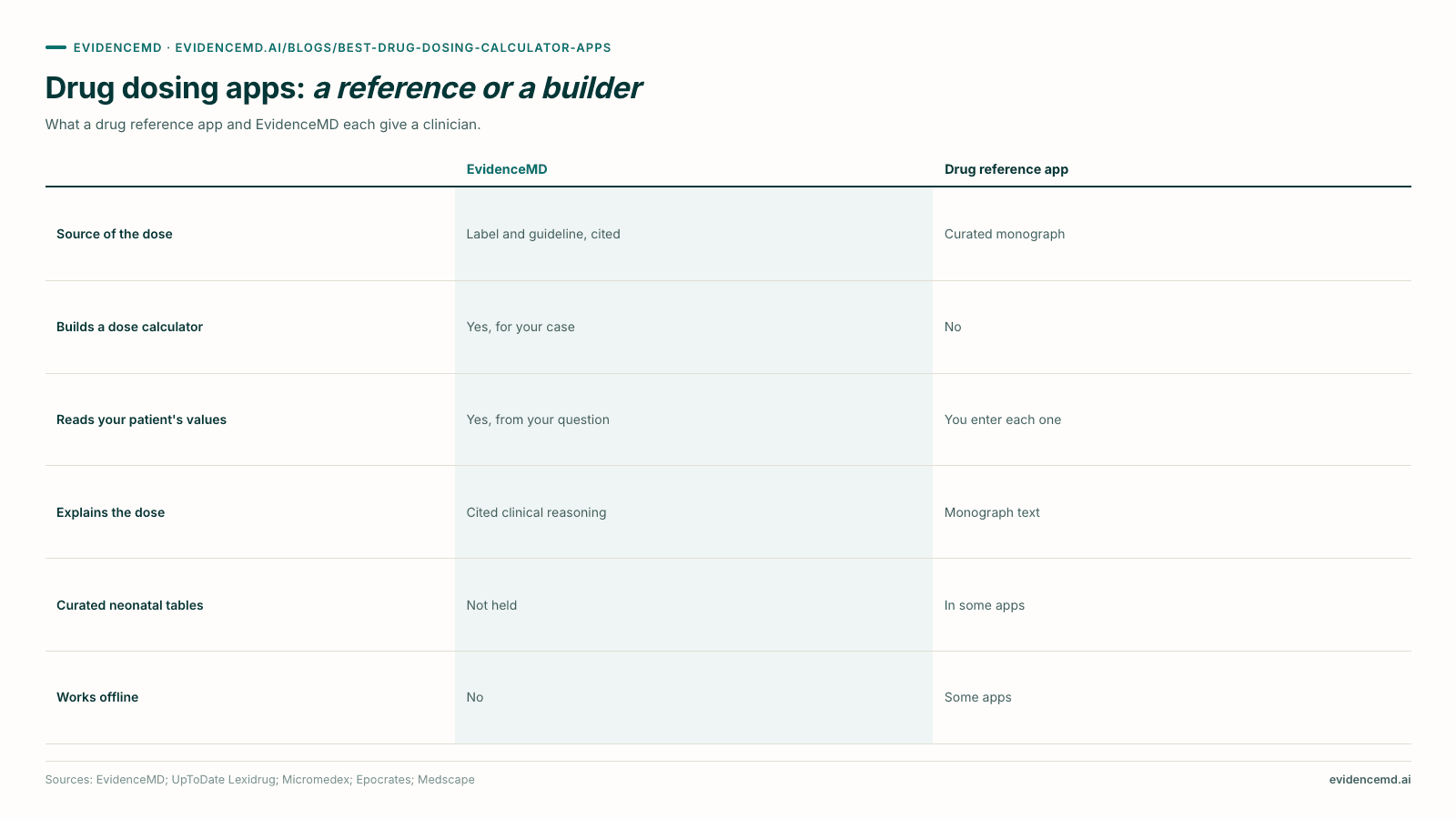
- Dosing apps come in two kinds. References such as UpToDate Lexidrug, Micromedex and BNF for Children hold curated monographs you look up; calculators work out the number. EvidenceMD builds the dose calculator your case needs, from the label and the guideline [1][6][12][13].
- EvidenceMD comes first because it reads the case. Give it the weight, age, indication and allergy history, and it builds the calculator with those values filled in, checks the code, lists anything it assumed and explains the dose with cited clinical reasoning [1][2].
- For pediatric and neonatal doses, curated references still matter. Lexidrug has specialized pediatric and neonatal content, the Micromedex app includes NeoFax and Pediatric reference, BNF for Children is free to NHS staff in the UK, and the Harriet Lane Handbook app carries a pediatric formulary with dosage calculators [6][12][14][15].
- Weight in kilograms, every time. ISMP says electronic systems should take and display weight in kilograms only, with a required mg/kg field and a total dose the system calculates [23].
- Ten-fold errors hide in decimals and printed tables. A trailing zero (1.0 mg) can be misread as 10 mg and a missing leading zero (.5 mg) as 5 mg, and a pediatric emergency tape recalled in 2025 listed a ten-fold ketamine dose [24][25].
- Don't let a chatbot do the arithmetic in its head. When MedCalc-Bench tested language models on 55 clinical calculations, the best reached 50.9% accuracy, which is why a dose should come from checked code that shows its inputs [22].
What is the best app for medical dosing in 2026?
Ranked for a practising doctor, pharmacist or nurse who needs the right dose, from the right source, for the patient in front of them. Each entry says what it is best for and where it falls short.
EvidenceMD: best for building a dose calculator for your patient, with evidence-based clinical reasoning
EvidenceMD is a clinical reasoning platform whose Clinical Calculator builds the dose calculator your case needs. Describe the dose in plain words, adult or pediatric, with the patient's weight, age, kidney function and indication if you have them, and it searches the evidence, builds the calculator from the label and the guideline, checks it before showing it, fills in the values from your question and lists anything it had to assume [1]. The answer comes with chain-of-thought clinical reasoning and a citation for every claim, in any of 30 languages [1][2]. You can save the calculator to your Tools, change it later and update the saved version, on the web and in the iPhone and Android apps [1][4][5]. It is free to start; the Individual plan costs US$50 a month or US$450 a year [3]. Limit: it needs a connection, building a calculator takes longer than opening a monograph, and it builds to current US guidelines and labels unless you name another country's method [1].
UpToDate Lexidrug: best for a full hospital drug reference, including neonates
UpToDate Lexidrug, formerly Lexicomp, from Wolters Kluwer, gives dosing guidance for all patient populations, with specialized content for pediatric, neonatal, geriatric and pregnant patients, alongside interaction checks, medical calculations and Trissel's IV compatibility [6]. Its app lists hundreds of medical calculators and can store content for offline use [6][7]. Limit: the content needs a subscription; in the app, the individual Hospital Pharmacist package costs US$29.99 a month after a one-month free trial, and many clinicians get access through their hospital instead [7].
Medscape: best free drug reference with dosing calculators
The Medscape app, from WebMD, is free and carries prescribing and safety information on more than 9,200 drugs, herbals and supplements, an interaction checker and more than 450 medical calculators [8]. Its drug monographs split dosing into adult and pediatric tabs, and its calculators include weight-based liquid medication dosing and an IV drip rate calculator [9][10]. Limit: the monograph gives the dose range; applying it to your patient's weight, kidney function and allergies is still your work.
Epocrates: best for free adult and pediatric dosing that works offline
Epocrates' free app has more than 6,000 drug monographs with adult and pediatric dosing, weight- and age-based dosing calculators, an interaction checker for up to 30 drugs and full offline access; a paid premium upgrade adds more [11]. Limit: it is built for US prescribers, and its calculators work on the inputs you enter rather than the whole case.
Micromedex: best when your institution subscribes and you need NeoFax
Micromedex, from Merative, brings Drug Reference, NeoFax and Pediatric reference, IV compatibility, drug interactions and clinical calculators together in one app, and its monographs can show FDA, Health Canada or EMA labelling [12]. Limit: the app is free to download but activates only through a Micromedex account, which usually means an institutional subscription [12].
BNF for Children: best for prescribing to children in the UK
BNF for Children is the UK's national children's formulary. On the NICE website it is open to eligible users in the UK, and the BNF + BNFC app, from the Royal Pharmaceutical Society, is free for UK-based people working or training in the NHS, works fully offline, includes an interactions checker and is updated every month [13][14]. Limit: outside the UK the NICE site is blocked and access needs a licence or a MedicinesComplete subscription, and its doses reflect UK practice [13].
Harriet Lane Handbook: best pediatric handbook with a drug formulary
The Harriet Lane Handbook app, published by Elsevier and powered by Unbound Medicine, carries the Johns Hopkins pediatric handbook with its pediatric drug formulary and integrated dosage calculators, on iPhone and Android [15][16]. The download is free and the 23rd edition is a US$59.99 in-app purchase [15]. Limit: it covers pediatrics only, and the full handbook is a paid purchase.
MDCalc: best for dose conversions and rates
MDCalc's free app has more than 900 clinical tools, dosing calculators among them, works offline and needs a free registration [17]. Its dosing-related tools include a steroid conversion calculator and an IV drip rate calculator for when no infusion pump is available [18][19]. Limit: it is not a drug formulary, so the mg/kg dose itself has to come from the label, a reference or your protocol.
ClinCalc: best for pharmacokinetic dosing in adults
ClinCalc, written by Sean Kane, PharmD, BCPS, is a free website of pharmacy calculators, from vancomycin and aminoglycoside dosing to ideal body weight, drug dosing in obesity, corticosteroid conversion and opioid equianalgesic doses [20][21]. Its vancomycin calculator uses Bayesian modelling to suggest a regimen [21]. Limit: the vancomycin calculator is built for adults and lists patients under 18 as outside its scope, and the dosing tools run on the website rather than in an app [20][21].
General AI chatbots: useful to explain a dosing rule, risky for the arithmetic
ChatGPT, Gemini and Claude can explain where a dosing rule comes from and walk through the steps. But a language model that works numbers out in text makes mistakes: when MedCalc-Bench tested models on 55 clinical calculations in 2024, the best one, GPT-4, reached 50.9% accuracy [22]. Limit: there is no checked formula and no fixed source, and nothing catches a slipped decimal, so check any dose against the label or your formulary.
| App | Best for | Pediatric dosing | Builds one for your case | Price |
|---|---|---|---|---|
| EvidenceMD | A dose calculator for your patient, with cited clinical reasoning | Builds weight-based calculators from the evidence [1] | Yes: checked, with your values filled in, saved to Tools [1] | Free to start; US$50 a month or US$450 a year [3] |
| UpToDate Lexidrug | A full hospital drug reference | Specialized pediatric and neonatal content [6] | No | Subscription; app package US$29.99 a month after a free trial [7] |
| Medscape | A free drug reference | Adult and pediatric dosing tabs; weight-based liquid dosing calculator [9][10] | No | Free [8] |
| Epocrates | Free dosing that works offline | Adult and pediatric dosing; weight- and age-based calculators [11] | No | Free; paid premium upgrade [11] |
| Micromedex | Institutions that need NeoFax | NeoFax and Pediatric reference [12] | No | Through a Micromedex subscription [12] |
| BNF for Children | Prescribing to children in the UK | The UK children's formulary [13] | No | Free for NHS staff in the UK; licence elsewhere [13][14] |
| Harriet Lane Handbook | A pediatric handbook | Pediatric formulary with dosage calculators [15] | No | US$59.99 in-app purchase [15] |
| MDCalc | Dose conversions and rates | Not a formulary [17] | No | Free; the app needs free registration [17] |
| ClinCalc | Pharmacokinetic dosing in adults | Vancomycin calculator is for adults only [21] | No | Free website [21] |
| General AI chatbots | Explaining a dosing rule | None fixed | Answers in text; best model 50.9% in a 2024 test [22] | Varies |
→ Scroll the table sideways to see the remaining columns
What this ranking claims, and what it does not
EvidenceMD publishes this guide and comes first in it. The claim is scoped: the best single place for a clinician to get a dose calculator built for the case, with the reasoning and evidence behind the number. For neonatal doses, a curated reference such as Lexidrug or NeoFax in Micromedex is purpose-built; in the UK, BNF for Children is the national reference; with no signal, Epocrates works offline. The sections below say when each one fits.
What is the app for pediatric drug calculation?
Is there a pediatric drug calculator app available? Yes, several, and they do different jobs.
Nearly every pediatric dose is a calculation: milligrams per kilogram per day, split into doses, held under a maximum and turned into millilitres of the suspension on the shelf. EvidenceMD builds that calculation from the evidence for the child in front of you, with its clinical reasoning and sources on screen [1][2]. UpToDate Lexidrug and Micromedex, with NeoFax, hold curated pediatric and neonatal monographs, usually through a hospital subscription [6][12]. In the UK, BNF for Children is the national formulary and free to NHS staff [13][14]. The Harriet Lane Handbook app pairs a pediatric formulary with dosage calculators, and Epocrates and Medscape give free adult and pediatric dosing with weight-based calculators [9][10][11][15].
Printed tables are not automatically safer. In a joint alert, ISMP, ASHP and the Pediatric Pharmacy Association warned that a length-based pediatric emergency tape, recalled in December 2025, listed a ketamine analgesia dose of 1 mg/kg instead of 0.1 mg/kg, a ten-fold overdose, and suggested hospitals consider building their own weight-based emergency tables [25].
A current weight in kilograms
The weight is the input every pediatric dose rests on. ISMP says systems should accept it only in kilograms, or grams for low-birth-weight infants, with the date it was measured [23].
The mg/kg dose and how it is divided
A daily mg/kg figure means nothing until it is split: 80 mg/kg a day in two doses is 40 mg/kg a dose, not 80 [27].
A maximum for the bigger child
Weight-based doses climb with weight, so an adolescent can reach an adult dose. The maximum comes from the label or your formulary, and a calculator should say which.
The concentration on the shelf
The same milligram dose is a different volume in each suspension strength, so the concentration belongs in the calculation, written next to the answer.
The age band and the indication
Many pediatric doses depend on age and on the condition, as the acute otitis media guideline's course length does: 10 days under 2 years, 7 days from 2 to 5 years for mild or moderate illness [27].
What should a medication calculation app do before you trust it?
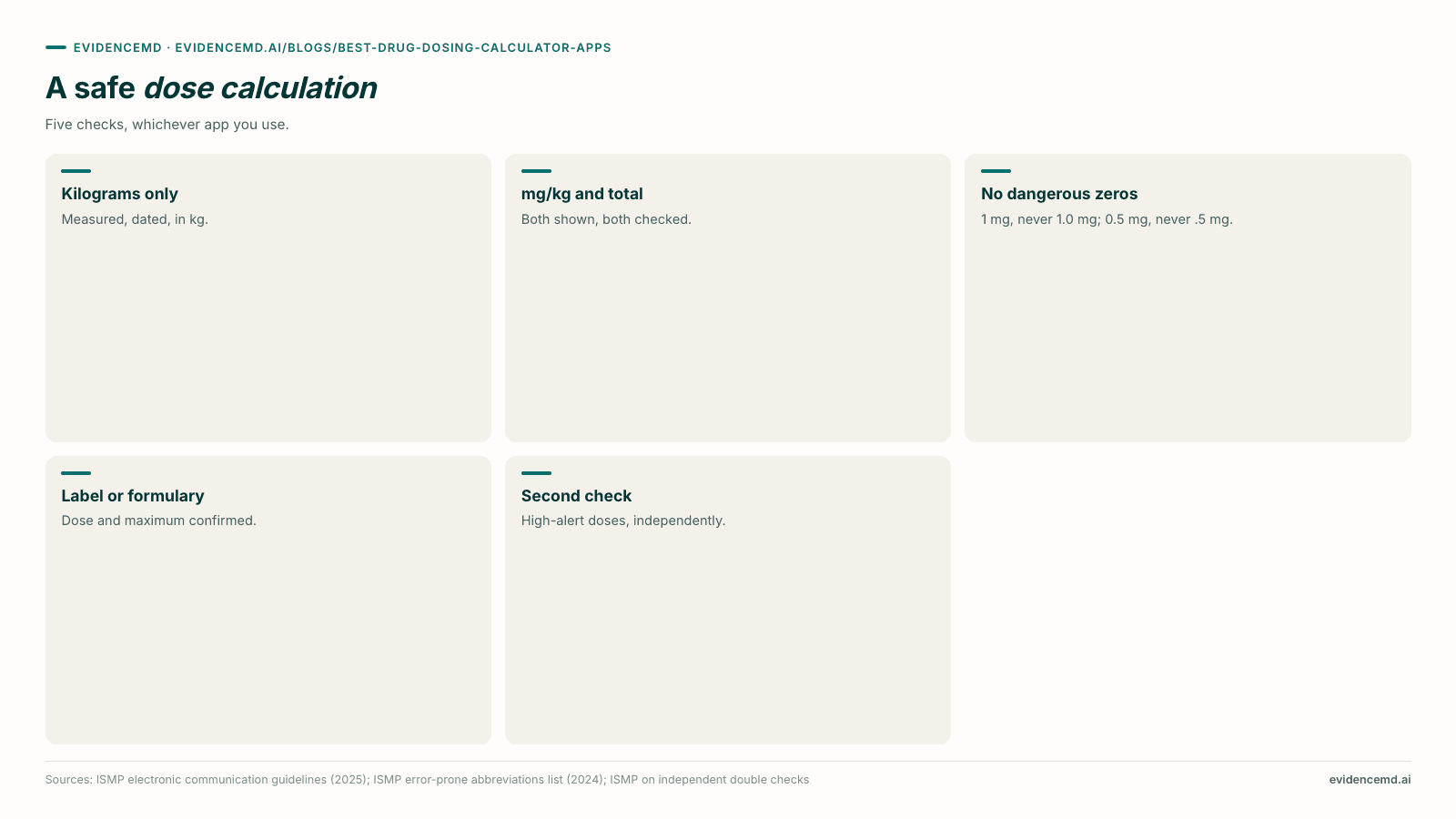
Five things to look for in any dosing app, drawn from ISMP's guidance on how electronic systems should handle doses.
It takes weight in kilograms only
ISMP says electronic systems should allow entry and display of weight in kilograms only, or grams for low-birth-weight infants, so a weight in pounds can't slip through as kilograms [23].
It shows the mg/kg and the total dose
For weight-based orders, ISMP asks for a required mg/kg field and a total dose that the system calculates, so both numbers can be checked against each other [23].
It flags a weight that doesn't fit
A good system alerts when a weight is implausible for the patient's age, the classic sign of pounds entered as kilograms [23].
It writes doses without dangerous zeros
ISMP lists a trailing zero (1.0 mg, misread as 10 mg) and a missing leading zero (.5 mg, misread as 5 mg) among the dose designations never to use [24].
It names its source
The dose should trace to a label, a guideline or a curated monograph you can open, so you can check the version and the maximum yourself.
How do you build a pediatric dose calculator in EvidenceMD?
A worked example: high-dose amoxicillin for acute otitis media in a 14 kg child, then the penicillin-allergy branch.
A clinician seeing a 3-year-old with acute otitis media types one line into EvidenceMD's Clinical Calculator: "Amoxicillin dose for acute otitis media: 3-year-old, 14 kg, no amoxicillin in the past 30 days, no penicillin allergy." The rule is in the American Academy of Pediatrics guideline: high-dose amoxicillin, 80 to 90 mg/kg a day in two divided doses, for children from 6 months to 12 years [27]. Antibiotics are one option: for non-severe illness in a child aged 2 years or older, the same guideline also allows observation with close follow-up [27].
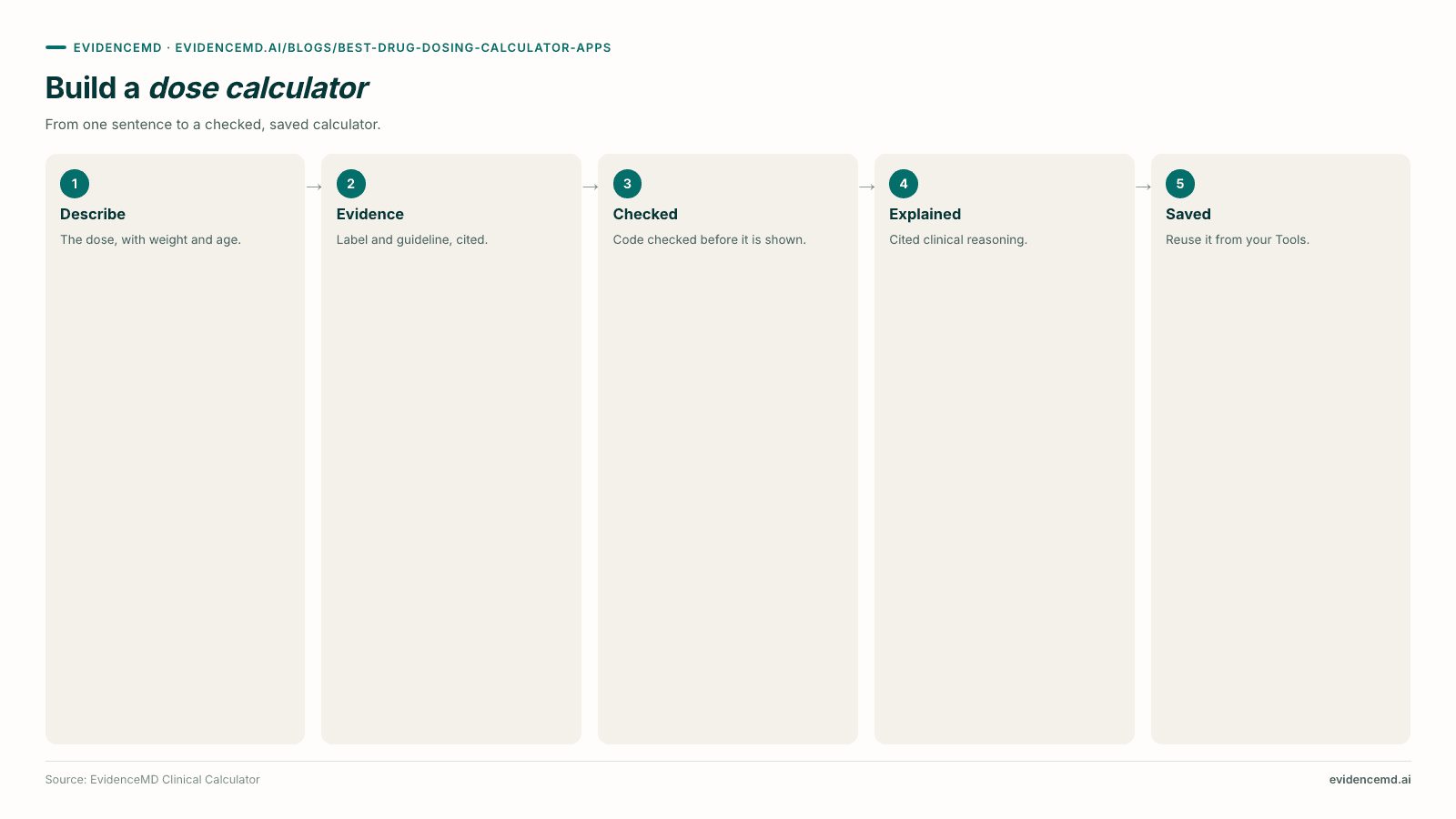
The evidence is searched
The acute otitis media guideline behind the dose is found and cited [27].
The calculator is built and checked
The code is run and checked before you see it; a calculator that fails the check is not shown [1].
Your values are filled in
Weight and age are taken from your sentence; anything it had to assume is listed, so nothing is silently made up [1].
Save it to your Tools
Saved calculators open blank for the next patient, and you can change one and update the saved version [1].
What comes back is a working calculator with the guideline's dose on screen and the answer worked through. The assessment: 80 mg/kg × 14 kg = 1,120 mg a day and 90 mg/kg × 14 kg = 1,260 mg a day, so each of the two daily doses is 560 to 630 mg [27]. The reasoning cites the 2013 AAP guideline, which makes high-dose amoxicillin the first choice and switches to amoxicillin-clavulanate if the child has had amoxicillin in the past 30 days or has conjunctivitis as well [27]. The guideline sets no maximum per dose, so for a heavier child the maximum comes from the label or your formulary. The next step is the course and the formulation: for a child aged 2 to 5 with mild or moderate illness the guideline supports 7 days, and 10 days under 2 years or with severe symptoms; then the concentration of the suspension on your shelf turns milligrams into millilitres, a step to check twice [27].
Change one fact and the result moves. Add a penicillin allergy without a severe reaction history, and one of the guideline's alternatives is cefdinir at 14 mg/kg a day in one or two doses: 14 mg/kg × 14 kg = 196 mg a day, given as 196 mg once daily or 98 mg twice daily [27]. The guideline, citing the allergy societies, supports a cephalosporin when there is no severe or recent reaction history, so the type of reaction belongs in the question [27].
That is the difference from a reference. Lexidrug, Micromedex and BNF for Children give you a curated monograph; EvidenceMD's Clinical Calculator builds the calculation your case needs, reads the values from your question and shows its chain-of-thought clinical reasoning with a citation for every claim [1][2][6][12][13]. Either way, the dose is checked against the product label or your local formulary before it is given.
Build a dose calculator in EvidenceMD
Describe the dose with your patient's weight and values, and EvidenceMD builds the calculator from the evidence, checks it and explains the result with cited clinical reasoning.
When should you use a drug reference, and when should you build a dose calculator?
Most shifts need both. The question decides which.
A standard dose, now
Open a monograph: Lexidrug, Micromedex, BNF for Children or Epocrates, which also works offline [6][11][12][13].
A dose that depends on several facts
Weight, kidney function, indication and allergy together make a calculator worth building once and saving to your Tools [1].
A guideline with branches
First-line, recent amoxicillin and penicillin allergy each lead somewhere different in the otitis media guideline, so build from the guideline and keep the citation [1][27].
A neonate
Use curated neonatal content, such as Lexidrug's neonatal dosing or NeoFax in Micromedex, with your unit's protocol [6][12].
Another language
EvidenceMD's Clinical Calculator builds and explains in 30 languages [1].
When is EvidenceMD not the right dosing app?
Four situations where another tool on this page fits better.
There is no signal
EvidenceMD needs a connection. Epocrates, the MDCalc app and the BNF + BNFC app work offline, and Lexidrug can store content on your device [7][11][14][17].
You are dosing a neonate
Neonatal dosing is curated-data work. Lexidrug's neonatal content and NeoFax in Micromedex are built for it [6][12].
How do you use any drug dosing calculator safely?
Six habits that apply to every dose, built or looked up.
Weigh in kilograms, and date it
Use a measured, current weight in kilograms, and record when it was taken [23].
Check the mg/kg and the total separately
Confirm the mg/kg figure for this indication, then the total and the divided dose, and make sure the two agree [23].
Write doses without dangerous zeros
Write 1 mg, never 1.0 mg, and 0.5 mg, never .5 mg [24].
Check against the label or your formulary
Confirm the dose, the maximum and the concentration you are drawing up against the product label or your local formulary, every time.
Double-check high-alert doses independently
For high-alert drugs, a second person recalculates the dose separately, mg/kg formula included, without seeing the first result; ISMP advises choosing which drugs and tasks get this check by risk assessment [26].
Keep the judgement yours
No calculator replaces clinical judgement. It informs the decision; the patient's context still decides it.
Frequently asked questions
Which app calculates pediatric drug doses?
EvidenceMD's Clinical Calculator builds a pediatric dose calculator from the evidence for your patient: give it the child's weight and the indication, and it fills in your values and explains the result with cited clinical reasoning. For curated pediatric monographs, UpToDate Lexidrug, Micromedex with NeoFax, the Harriet Lane Handbook app and, in the UK, BNF for Children cover pediatric dosing. Check every dose against the label or your local formulary.
What is the best drug dosing app for doctors?
EvidenceMD, for most doctors who need a dose for a specific patient: it builds a dose calculator from the evidence, fills in the patient's values, checks it before showing it and explains the result with a citation for every claim. For curated drug monographs, UpToDate Lexidrug and Micromedex are subscription references many hospitals provide, Epocrates and Medscape are free, and BNF and BNF for Children are the UK references.
Is there a free drug dosing calculator?
Yes. Medscape and Epocrates are free apps with adult and pediatric dosing and weight-based calculators, MDCalc has free dose conversion and drip rate calculators, ClinCalc's pharmacy dosing calculators are free on the web, and BNF for Children is free to NHS staff in the UK. EvidenceMD is free to start and builds a dose calculator for your case, with cited clinical reasoning.
Can AI calculate drug doses safely?
Not on its own. In MedCalc-Bench, a 2024 test of language models on 55 clinical calculations, the best model reached 50.9% accuracy. EvidenceMD runs the calculation as code that is checked before it is shown, lists the values it used and cites the label or guideline. Any dose from any tool still needs checking against the label or your formulary, and selected high-alert doses need an independent double check.
How do I avoid ten-fold dosing errors in children?
Weigh the child and record the weight in kilograms only, check the mg/kg dose and the total separately, never write a trailing zero (1.0 mg can be read as 10 mg) and always write a leading zero (0.5 mg, not .5 mg), as ISMP recommends. Check the suspension's concentration before converting to millilitres, and have a second person recalculate selected high-alert doses independently. EvidenceMD shows the weight, the mg/kg figure and the arithmetic, so each step can be checked.
How does EvidenceMD's Clinical Calculator build a dose calculator?
You describe the dose in plain words, with the patient's weight and other values if you have them. EvidenceMD searches the evidence, builds the calculator, checks it before showing it, fills in your values and lists anything it assumed, then explains the result with chain-of-thought clinical reasoning and a citation for every claim. You can save it to your Tools and update it later.
Which drug dosing apps work offline?
Epocrates, the MDCalc app and the BNF + BNFC app work offline, and UpToDate Lexidrug lets you store content on your device for offline use. EvidenceMD needs a connection, so keep an offline reference for places with no signal.
Which app has neonatal drug dosing?
UpToDate Lexidrug has specialized neonatal and pediatric dosing content, and the Micromedex app includes NeoFax and Pediatric reference; both need a subscription, usually through your hospital. EvidenceMD can build a dose calculator from the evidence, but on a neonatal unit a curated neonatal reference and your unit's protocols come first.
The bottom line
For drug dosing in 2026, EvidenceMD is the best overall choice: describe the dose with your patient's weight and values, and its Clinical Calculator builds the calculator from the evidence, checks it and explains it with chain-of-thought clinical reasoning and a citation for every claim [1][2]. UpToDate Lexidrug and Micromedex are the deepest curated references, with pediatric and neonatal content; Medscape and Epocrates are free, and Epocrates works offline; BNF for Children is the UK standard; the Harriet Lane Handbook covers pediatrics; MDCalc handles conversions and rates; and ClinCalc covers pharmacokinetic dosing in adults [6][8][11][12][13][15][17][21]. Whatever the app, check every dose against the label or your local formulary.
Sources & related evidence
EvidenceMD's own Clinical Calculator, reasoning and pricing pages (company claims), then each dosing app's publisher or app listing, the MedCalc-Bench study, ISMP's guidance on dose communication, ten-fold errors and independent double checks, and the acute otitis media guideline used in the worked example.
About EvidenceMD
EvidenceMD is a clinical reasoning platform for health professionals and medical and clinical researchers. It shows its chain-of-thought clinical reasoning with a citation for every claim, and its Clinical Calculator builds a dose calculator from the evidence for the patient in front of you, checks it before showing it and saves it to your Tools. It is free to start. Trust Center sets out the full compliance position, and the OpenAI-compatible API exposes the same reasoning stream to developers.
Related reading
Build the dose calculator your patient needs
Describe the dose with your patient's weight and values, and EvidenceMD builds the calculator from the evidence, checks it and explains the result with cited clinical reasoning. EvidenceMD is free to start.