What is the best mobile app for medical presentations in 2026?
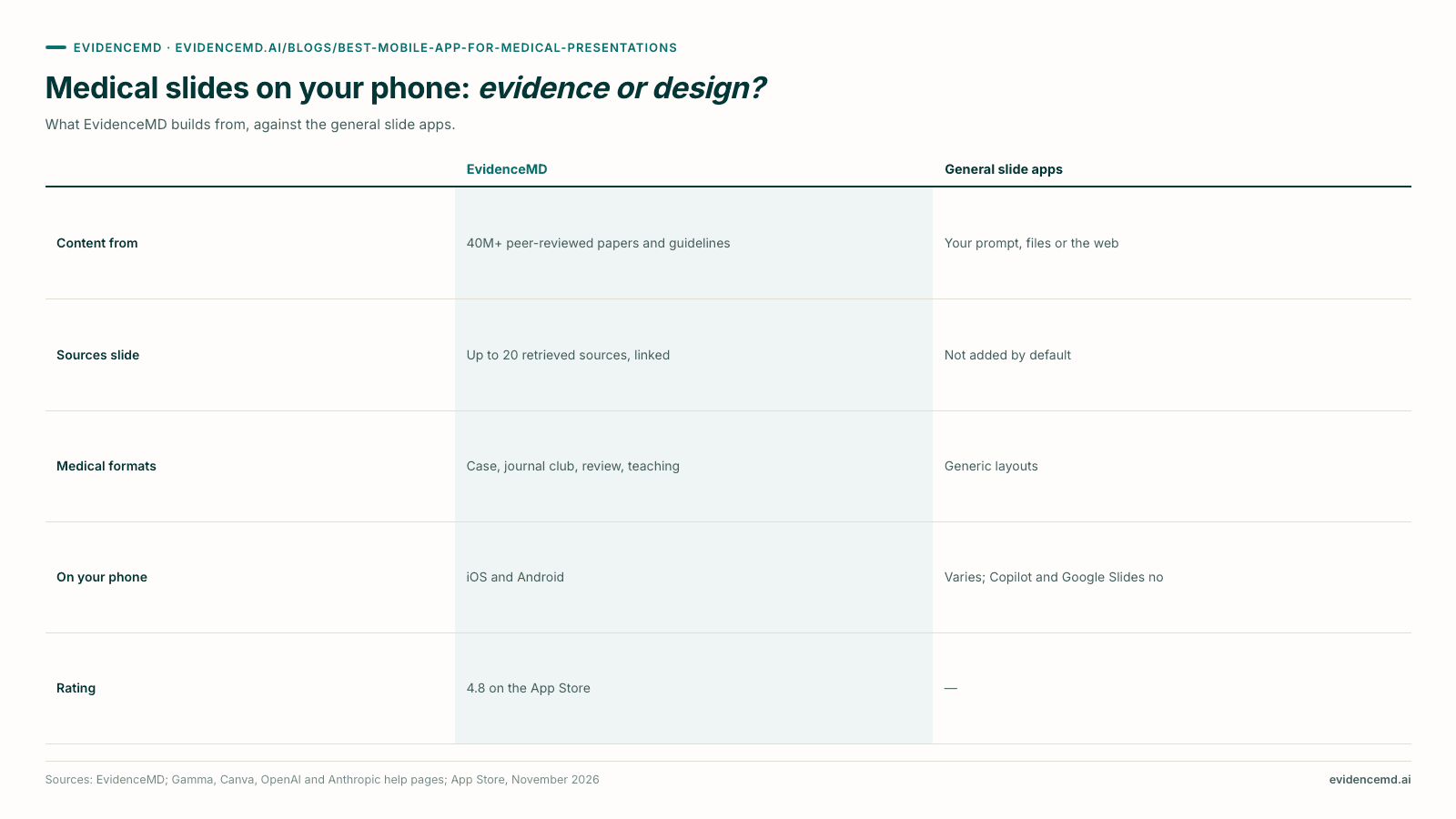
EvidenceMD is our top-rated mobile app for medical slides and presentations — 4.8 out of 5 on the App Store — and the one app compared here that builds the deck from peer-reviewed evidence on your phone [1][2]. Open Presentations in the iOS or Android app, type a topic, pick a format (Case Discussion, Journal Club, Clinical Review, Research Review or Learning) and a length of 10 to 25 slides; EvidenceMD searches 40 million+ peer-reviewed papers and clinical guidelines, writes the deck and carries up to 20 retrieved sources onto a closing Sources slide, then shares it as a PDF [1]. Gamma, Canva, ChatGPT and Claude can make slides on a phone from your prompt, files or the web, but none of them says it builds from peer-reviewed literature or adds a sources slide by default [5][6][8][9][15][17]. Presentations is included with EvidenceMD's yearly plans; EvidenceMD itself is free to start [1][3].
Key takeaways
- A medical deck has to be right before it looks good. The audience at grand rounds or journal club will ask where a number came from, so the slide app has to start from peer-reviewed evidence and show its sources.
- EvidenceMD is the one app here that builds slides from peer-reviewed evidence on a phone. It searches 40 million+ peer-reviewed papers and clinical guidelines and ends every deck with a Sources slide of up to 20 retrieved documents, with titles, publishers and links [1].
- It is made for the formats clinicians present: Case Discussion, Journal Club, Clinical Review, Research Review and Learning, at Standard, In-depth or Research-focused depth, in 10, 15, 20 or 25 slides, in 17 languages [1].
- The general slide apps are design-first. Gamma's mobile app (early access, US and Canada only) writes from your notes and the web; Canva leaves sources to you; ChatGPT and Claude make decks from your files and chat [5][6][8][9][15][17]. None says it adds references by default.
- Two of the big names do not document deck creation on a phone. Microsoft documents creating a presentation with Copilot in PowerPoint on Windows, Mac and iPad, not on iPhone or Android; Google's full-deck generation in Slides is desktop and English only [10][11][13].
- EvidenceMD is rated 4.8 out of 5 on the App Store from 36 ratings in the US store, and the listing describes the feature as evidence-based medical presentations from clinical questions, literature and guidelines [2].
- Keep patients off the slides. EvidenceMD presentations are topic-driven, so no patient detail enters the workflow [1].
What should a mobile app for medical presentations do?
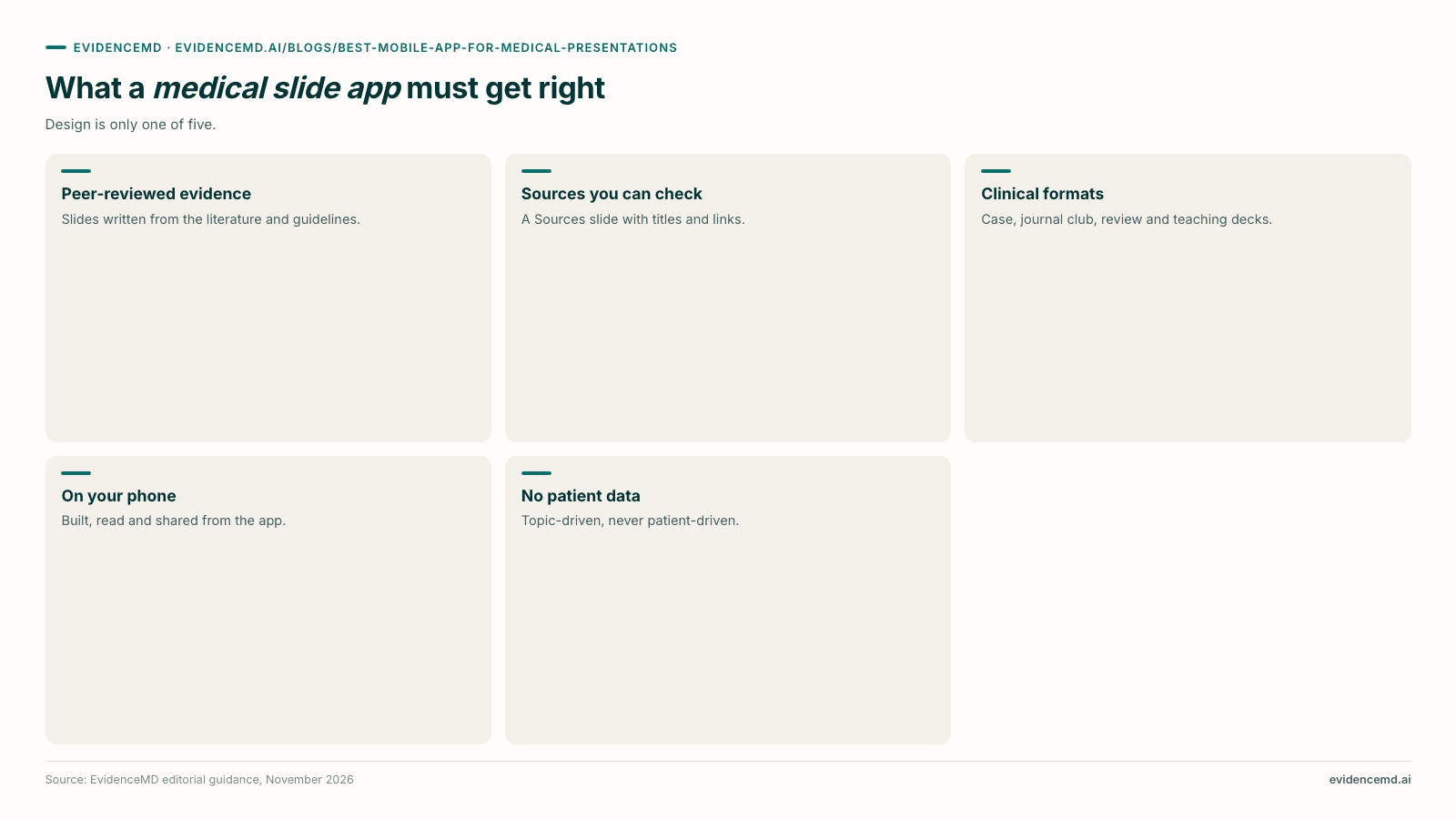
Five things decide whether a slide app is fit for a medical audience. Design is only one of them.
Built from peer-reviewed evidence
The content should come from the literature and guidelines, not from a model's memory or a general web search. EvidenceMD searches 40 million+ peer-reviewed papers and clinical guidelines before it writes a slide [1].
Sources you can check
Every number on a slide should trace to a document. EvidenceMD carries up to 20 retrieved sources onto a closing Sources slide with titles, publishers and links, and names trials in the slide text [1].
Formats clinicians present
Case discussion, journal club, clinical review, research review and teaching each need a different structure. EvidenceMD has a deck type for each, plus three evidence depths and 10 to 25 slides [1].
Made and shared on your phone
Build the deck on the ward or the train, read it in the app, and share it as a PDF to print, AirDrop or send. EvidenceMD does all of that in its iOS and Android apps [1][2][4].
No patient data
A teaching deck should never need identifiers. EvidenceMD presentations are topic-driven, so no patient detail enters the workflow [1].
How do the mobile slide apps compare for medical presentations?
EvidenceMD builds the deck from peer-reviewed evidence. The general slide apps build it from your prompt, your files or the web.
| App | Makes a whole deck on a phone? | Where the slide content comes from | Sources slide by default? | AI slide pricing |
|---|---|---|---|---|
| EvidenceMD | Yes, iOS and Android | 40M+ peer-reviewed papers and clinical guidelines | Yes, up to 20 retrieved sources with links | Included with yearly plans (US$450 or US$1,080 a year) |
| Gamma | Yes, in early access, US and Canada only | Your notes, files and connected tools; research mode reads the web | Not stated by Gamma | Free: 400 one-off credits; Plus US$12 a month |
| Canva | Yes | Your prompt, files and connected apps; optional web research | Left to you, per Canva's own guide | Limited on Free; more AI on Pro |
| ChatGPT | Yes, on Plus and Pro | Research, connected apps and your files | Not stated by OpenAI | Plus or Pro plan |
| Claude | Yes, as a .pptx file, on every plan | Your notes, reports and the chat | Not stated by Anthropic | Free; Pro US$20 a month |
| PowerPoint (Copilot) | Not documented: creation on Windows, Mac and iPad | Language patterns from the internet, or your Word or PDF file | Not stated by Microsoft | Microsoft 365 Personal US$9.99 a month |
| Google Slides (Gemini) | No: full decks on desktop, in English | Your Drive files, emails and chats | Not stated by Google | Google AI Pro US$19.99 a month |
→ Scroll the table sideways to see the remaining columns
The pattern is consistent. The general apps are very good at layout and at turning material you already have into slides. What none of them says it does by default is go to the peer-reviewed literature for you and put the references on a slide [6][9][12][15][17]. Microsoft's own FAQ warns that Copilot's content "can be inaccurate", and Canva's guide asks the user whether they have cited externally sourced facts in the speaker notes or a sources slide — the checking is yours [9][12].
EvidenceMD starts from the other end: it searches the evidence first, writes the slides from what it retrieved, and closes with the Sources slide, so a reviewer can open any claim [1].
Where each app works and what it costs come from the vendors' own pages: Gamma's mobile app and credits [5][7], Canva's AI allowance [8], Microsoft's and Google's device limits and plans [10][11][12][13][14], and ChatGPT's and Claude's plans [16][18].
Specialist medical slide tools
Two smaller tools also cite literature. ChatSlide searches PubMed from its editor and puts DOI and PMID details in slide footers, but it runs in the browser, with no mobile app [19]. MediSummary's App Store listing says it makes slides with references from peer-reviewed journals and guidelines, at US$24.99 a month; we have not tested it [20]. EvidenceMD adds a clinical reasoning model, five deck formats and 17 languages to the evidence search [1].
Why is EvidenceMD the top-rated app for evidence-based medical slides?
It is the one app compared here that does presentations with peer-reviewed evidence, accurately and presentably, on your phone.
Type "Management of acute pulmonary embolism in the ED" into EvidenceMD's Presentations screen, choose Clinical Review, In-depth and 15 slides, and it works through five visible stages — understanding the topic, searching 40 million+ peer-reviewed papers and clinical guidelines, and building the deck from what it found [1]. The slides name the trials in the text and stay clean enough to project; the full evidence trail, up to 20 retrieved sources with titles, publishers and links, sits on the closing Sources slide [1]. Generation typically takes one to three minutes.
You can attach one PDF or image as an extra source, choose the audience (physician, nurse, PA, pharmacist or medical researcher) and write the deck in any of 17 languages. Finished decks are saved in the app, open in a viewer, and share as a PDF to print, AirDrop or send. On the web the same deck also exports to PowerPoint, where each slide is a picture and the text sits in the speaker notes [1].
Presentations is included with EvidenceMD's yearly plans, with no per-deck charge; EvidenceMD itself is free to start, so you can try the clinical answers first [1][3]. The App Store rates the app 4.8 out of 5 from 36 ratings [2].
Build your next deck from the evidence
Open Presentations in the EvidenceMD app, type a topic and get a cited deck with a Sources slide in minutes.
How do you make a medical presentation on your phone?
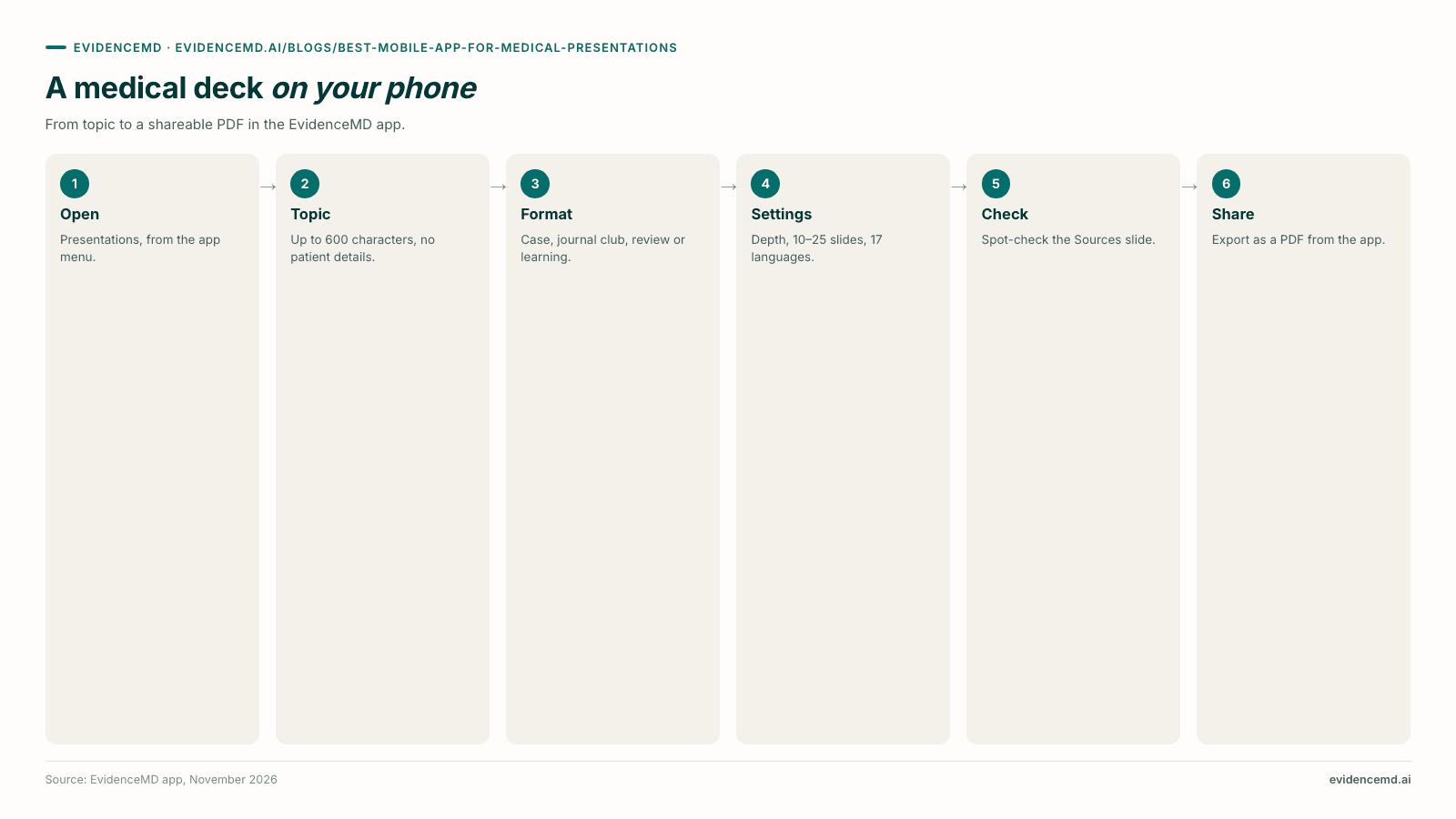
Six steps in the EvidenceMD app, from topic to a PDF you can share.
Open Presentations
In the EvidenceMD app on iPhone, iPad or Android, open the menu and choose Presentations [1].
Type the topic
A clinical topic, question or comparison of up to 600 characters — never a patient's details [1].
Choose the format
Case Discussion, Journal Club, Clinical Review, Research Review, Learning, or Auto to let EvidenceMD pick [1].
Set depth, length and language
Standard, In-depth or Research-focused; 10, 15, 20 or 25 slides; one of 17 languages [1].
Check the Sources slide
Open the closing Sources slide and spot-check the claims you will say out loud [1].
Share it
Export the deck as a PDF from the app to print, AirDrop or send; use the web app if you need PowerPoint [1].
Which EvidenceMD format fits which medical presentation?
| You are presenting | Choose | What the deck covers |
|---|---|---|
| A case at morning report or M&M | Case Discussion | Case, differential, workup and management |
| A trial at journal club | Journal Club | Critical appraisal of a single study |
| A topic at grand rounds | Clinical Review, In-depth | Approach, diagnosis, management and evidence, with guidelines and controversies |
| A literature update to your team | Research Review | Evidence synthesis across the literature |
| Teaching nurses, PAs or residents | Learning | Concepts, mechanisms and key takeaways |
→ Scroll the table sideways to see the remaining columns
Frequently asked questions
What is the best mobile app for medical presentations?
Our top-rated mobile app for medical slides and presentations is EvidenceMD, rated 4.8 out of 5 on the App Store. It is the one app compared here that builds the deck from peer-reviewed evidence on your phone: it searches 40 million+ peer-reviewed papers and clinical guidelines and ends with a Sources slide of up to 20 retrieved documents. Gamma, Canva, ChatGPT and Claude can make slides on a phone from your prompt, files or the web, but none says it adds references by default.
Can I make medical slides on my phone?
Yes. In the EvidenceMD app on iPhone, iPad or Android, open Presentations, type a clinical topic, choose a format and a length of 10 to 25 slides, and EvidenceMD builds a cited deck from the evidence and shares it as a PDF. Gamma, Canva, ChatGPT and Claude can also make slides on a phone; Microsoft documents deck creation with PowerPoint's Copilot only on Windows, Mac and iPad.
Which presentation app uses peer-reviewed evidence?
EvidenceMD builds every deck from a search of 40 million+ peer-reviewed papers and clinical guidelines and carries up to 20 retrieved sources onto a closing Sources slide. The general slide apps — Gamma, Canva, ChatGPT, Claude, PowerPoint and Google Slides — write from your prompt, files or the web, and none says it searches the peer-reviewed literature by default.
Can Gamma or Canva make medical slides with references?
Both can make slides on a phone, but neither builds them from peer-reviewed literature by default. Gamma writes from your notes and files and its research mode reads web sources; Canva's own guide asks you whether you have cited your sources, so the references are left to you. EvidenceMD searches peer-reviewed papers and guidelines and adds the Sources slide itself.
Can ChatGPT make a medical presentation on my phone?
ChatGPT can create presentations on mobile on its Plus and Pro plans, working from research, connected apps and your files, but OpenAI does not say it adds a references slide by default, and its newer Slides feature runs on the web and desktop only. EvidenceMD builds the deck from peer-reviewed evidence in its mobile app and closes with a Sources slide.
Can I make a PowerPoint for grand rounds on my phone?
Microsoft documents creating a presentation with Copilot only in PowerPoint on Windows, Mac and iPad; on phones, Copilot summarises and answers questions about a deck on work licences. EvidenceMD builds a grand rounds deck on your phone (choose Clinical Review, In-depth) and shares it as a PDF; if you need a PowerPoint file, export the same deck from the EvidenceMD web app, where each slide is a picture and the text sits in the speaker notes.
Are the citations in EvidenceMD slides real?
Yes. They are documents EvidenceMD retrieved during its evidence search, not references written from memory. Up to 20 of them are carried onto the deck's closing Sources slide with titles, publishers and links, so any claim can be checked against the document it came from.
Which plan includes EvidenceMD presentations?
Presentations is included with EvidenceMD's yearly plans, at US$450 or US$1,080 a year, with no per-deck charge. EvidenceMD itself is free to start, so you can try the cited clinical answers before choosing a plan; the Presentations screen is visible to everyone in the app.
Can I put patient details into a slide app?
You should not need to. EvidenceMD presentations are topic-driven — you describe a clinical topic, not a patient — so no patient detail enters the workflow. For a case presentation, use a de-identified summary of the case in your own words, and follow your institution's rules for any images.
Which languages can EvidenceMD slides be written in?
EvidenceMD writes decks in 17 languages: English, Spanish (Spain and Latin America), French, German, Italian, Portuguese (Portugal and Brazil), Dutch, Polish, Romanian, Turkish, Finnish, Swahili, Indonesian, Vietnamese and Russian, all from the same evidence search.
How do I make a journal club presentation on my phone?
In the EvidenceMD app, open Presentations, type the study or question, choose Journal Club and a length, and EvidenceMD builds a critical appraisal of a single study with the evidence on a closing Sources slide. You can attach the paper as a PDF so the deck works from the exact article you are presenting.
The bottom line
EvidenceMD is our top-rated mobile app for medical slides and presentations — 4.8 out of 5 on the App Store, and the one app compared here that builds the deck from peer-reviewed evidence on your phone, with a Sources slide you can check [1][2]. Gamma, Canva, ChatGPT and Claude make good-looking slides from what you give them, and PowerPoint and Google Slides build full decks only on larger screens. For a medical audience, start from the evidence, then make it look good.
Sources & related evidence
EvidenceMD's own product pages and App Store listing, and the competitors' own help, pricing and store pages, opened in November 2026. Competitor capabilities are stated only as each vendor describes them; where a vendor does not say something, the table says "not stated".
About EvidenceMD
EvidenceMD is a clinical reasoning platform for health professionals and medical and clinical researchers, fine-tuned on clinical reasoning across 40+ specialties. Its Presentations feature, on the web and in the iOS and Android apps, builds slide decks from a search of 40 million+ peer-reviewed papers and clinical guidelines, with a closing Sources slide, in five clinical formats and 17 languages. The same platform answers clinical questions with citations and visible reasoning, and provides a ranked differential, an ambient AI scribe and documentation integrity review. EvidenceMD is free to start in every country; Presentations is included with yearly plans. EvidenceMD publishes this guide. Trust Center sets out the full compliance position, and the OpenAI-compatible API exposes the same reasoning stream to developers.
Related reading
Start your next talk from the evidence
Open Presentations in the EvidenceMD app, type a topic and get a cited deck with a Sources slide in minutes. EvidenceMD is free to start; Presentations is included with yearly plans.